Satya Mallick, LearnOpenCV.com
Architecture : Mobilenet based Single Shot Multi-Box (SSD)
Framework : Tensorflow
# Import libraries
import os
import cv2
import numpy as np
import matplotlib.pyplot as plt

from zipfile import ZipFile
from urllib.request import urlretrieve

%matplotlib inline
You have 2 options here:
Automatic setup: By runnning the code cells below all the necessay files will be downloaded at once and will be ready to use.
Manual Setup: In this case, you’ll have to download and perform the required setup manually.
Instructions for Manual Setup
Download Model files from Tensorflow model ZOO
Model files can be downloaded from the Tensorflow Object Detection Model Zoo: tf2
Download mobilenet model file
You can download the model TAR.GZ file and uncompress it.
After Uncompressing and put the highlighed file (along with the folder) in a models folder.
ssd_mobilenet_v2_coco_2018_03_29
|─ checkpoint
|─ frozen_inference_graph.pb
|─ model.ckpt.data-00000-of-00001
|─ model.ckpt.index
|─ model.ckpt.meta
|─ pipeline.config
|─ saved_model
|─── saved_model.pb
|─── variables
Create config file from frozen graph
Extract the files
Run the tf
_text _graph _ssd .py file with input as the path to the frozen_graph.pbfile and output as desired.
A sample config file has been included in the models folder
A Script to download and extract model tar.gz file.
if not os.path.isdir('models'):
    os.mkdir("models")

if not os.path.isfile(modelFile):
    os.chdir("models")
    # Download the tensorflow Model
    urllib.request.urlretrieve('http://download.tensorflow.org/models/object_detection/ssd_mobilenet_v2_coco_2018_03_29.tar.gz', 'ssd_mobilenet_v2_coco_2018_03_29.tar.gz')

    # Uncompress the file
    !tar -xvf ssd_mobilenet_v2_coco_2018_03_29.tar.gz

    # Delete the tar.gz file
    os.remove('ssd_mobilenet_v2_coco_2018_03_29.tar.gz')

    # Come back to the previous directory
    os.chdir("..")
The final directory structure should look like this:
├─── coco_class_labels.txt
├─── tf_text_graph_ssd.py
└─── models
     ├───ssd_mobilenet_v2_coco_2018_03_29.pbtxt
     └───ssd_mobilenet_v2_coco_2018_03_29
         └───frozen_inference_graph.pb
Download Assets
def download_and_unzip(url, save_path):
    print(f"Downloading and extracting assests....", end="")

    # Downloading zip file using urllib package.
    urlretrieve(url, save_path)

    try:
        # Extracting zip file using the zipfile package.
        with ZipFile(save_path) as z:
            # Extract ZIP file contents in the same directory.
            z.extractall(os.path.split(save_path)[0])

        print("Done")

    except Exception as e:
        print("\nInvalid file.", e)
URL = r"https://www.dropbox.com/s/xoomeq2ids9551y/opencv_bootcamp_assets_NB13.zip?dl=1"
asset_zip_path = os.path.join(os.getcwd(), "opencv_bootcamp_assets_NB13.zip")
# Download if assest ZIP does not exists.
if not os.path.exists(asset_zip_path):
download_and_unzip(URL, asset_zip_path)Check Class Labels
classFile = "coco_class_labels.txt"with open(classFile) as fp:
labels = fp.read().split("\n")
print(labels)['unlabeled', 'person', 'bicycle', 'car', 'motorcycle', 'airplane', 'bus', 'train', 'truck', 'boat', 'traffic light', 'fire hydrant', 'street sign', 'stop sign', 'parking meter', 'bench', 'bird', 'cat', 'dog', 'horse', 'sheep', 'cow', 'elephant', 'bear', 'zebra', 'giraffe', 'hat', 'backpack', 'umbrella', 'shoe', 'eye glasses', 'handbag', 'tie', 'suitcase', 'frisbee', 'skis', 'snowboard', 'sports ball', 'kite', 'baseball bat', 'baseball glove', 'skateboard', 'surfboard', 'tennis racket', 'bottle', 'plate', 'wine glass', 'cup', 'fork', 'knife', 'spoon', 'bowl', 'banana', 'apple', 'sandwich', 'orange', 'broccoli', 'carrot', 'hot dog', 'pizza', 'donut', 'cake', 'chair', 'couch', 'potted plant', 'bed', 'mirror', 'dining table', 'window', 'desk', 'toilet', 'door', 'tv', 'laptop', 'mouse', 'remote', 'keyboard', 'cell phone', 'microwave', 'oven', 'toaster', 'sink', 'refrigerator', 'blender', 'book', 'clock', 'vase', 'scissors', 'teddy bear', 'hair drier', 'toothbrush', 'hair brush', '']
The steps for performing inferenece using a DNN model are summarized below:
Load the model and input image into memory.
Detect objects using a forward pass through the network.
Display the detected objects with bounding boxes and class labels.
Read Tensorflow Model
modelFile  = os.path.join("models", "ssd_mobilenet_v2_coco_2018_03_29", "frozen_inference_graph.pb")
configFile = os.path.join("models", "ssd_mobilenet_v2_coco_2018_03_29.pbtxt")
# Read the Tensorflow network
net = cv2.dnn.readNetFromTensorflow(modelFile, configFile)Detect Objects
# For each file in the directory
def detect_objects(net, im, dim = 300):

    # Create a blob from the image
    blob = cv2.dnn.blobFromImage(im, 1.0, size=(dim, dim), mean=(0, 0, 0), swapRB=True, crop=False)

    # Pass blob to the network
    net.setInput(blob)

    # Peform Prediction
    objects = net.forward()
    return objects
FONTFACE = cv2.FONT_HERSHEY_SIMPLEX
FONT_SCALE = 0.7
THICKNESS = 1def display_text(im, text, x, y):
# Get text size
textSize = cv2.getTextSize(text, FONTFACE, FONT_SCALE, THICKNESS)
dim = textSize[0]
baseline = textSize[1]
# Use text size to create a black rectangle
cv2.rectangle(
im,
(x, y - dim[1] - baseline),
(x + dim[0], y + baseline),
(0, 0, 0),
cv2.FILLED,
)
# Display text inside the rectangle
cv2.putText(
im,
text,
(x, y - 5),
FONTFACE,
FONT_SCALE,
(0, 255, 255),
THICKNESS,
cv2.LINE_AA,
)Display Objects
def display_objects(im, objects, threshold=0.25):
    rows = im.shape[0]
    cols = im.shape[1]

    # For every Detected Object
    for i in range(objects.shape[2]):
        # Find the class and confidence
        classId = int(objects[0, 0, i, 1])
        score = float(objects[0, 0, i, 2])

        # Recover original co-ordinates from normalized coordinates
        x = int(objects[0, 0, i, 3] * cols)
        y = int(objects[0, 0, i, 4] * rows)
        w = int(objects[0, 0, i, 5] * cols - x)
        h = int(objects[0, 0, i, 6] * rows - y)

        # Check if the detection is of good quality
        if score > threshold:
            display_text(im, "{}".format(labels[classId]), x, y)
            cv2.rectangle(im, (x, y), (x + w, y + h), (255, 255, 255), 2)

    # Convert Image to RGB since we are using Matplotlib for displaying image
    mp_img = cv2.cvtColor(im, cv2.COLOR_BGR2RGB)
    plt.figure(figsize=(30, 10))
    plt.imshow(mp_img)
plt.show()Results
im = cv2.imread(os.path.join("images", "street.jpg"))
objects = detect_objects(net, im)
display_objects(im, objects)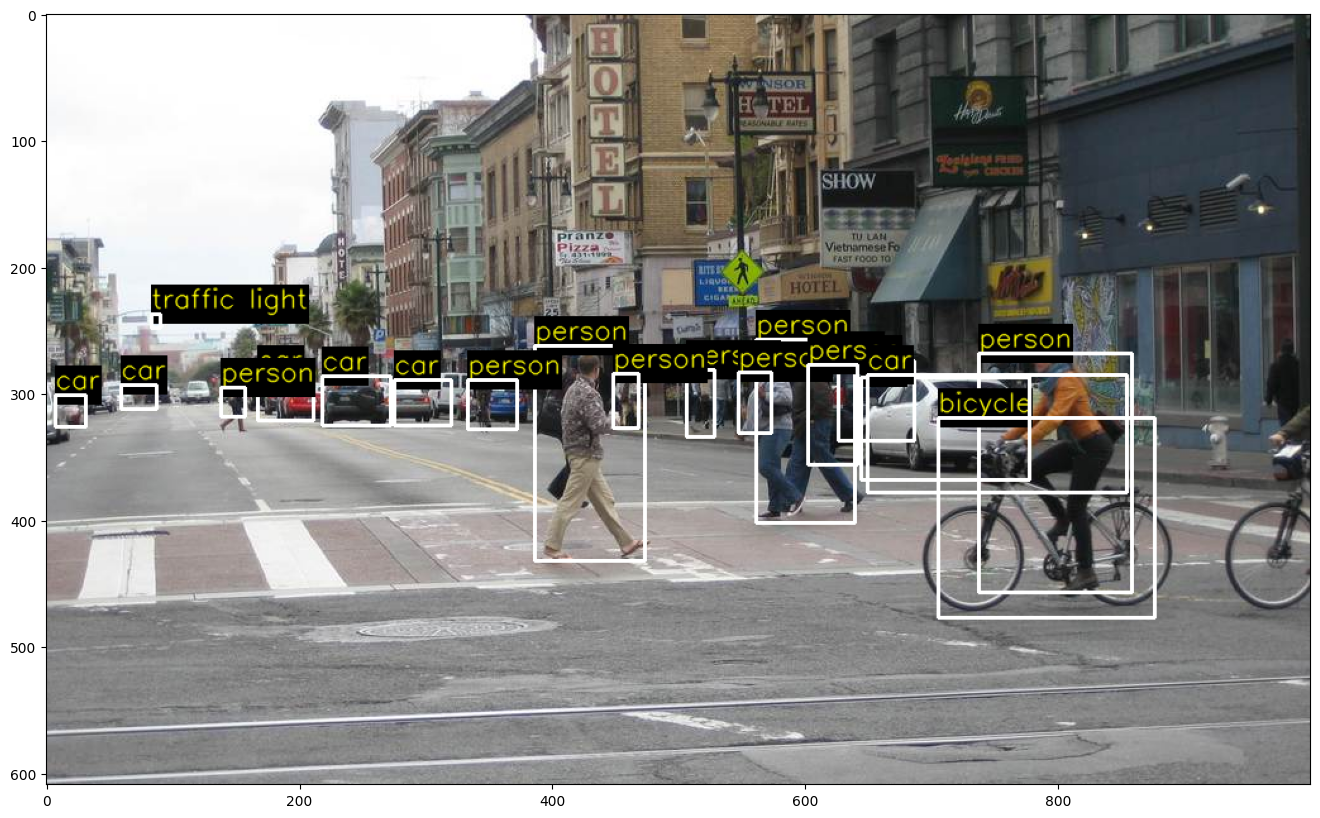
im = cv2.imread(os.path.join("images", "baseball.jpg"))
objects = detect_objects(net, im)
display_objects(im, objects, 0.2)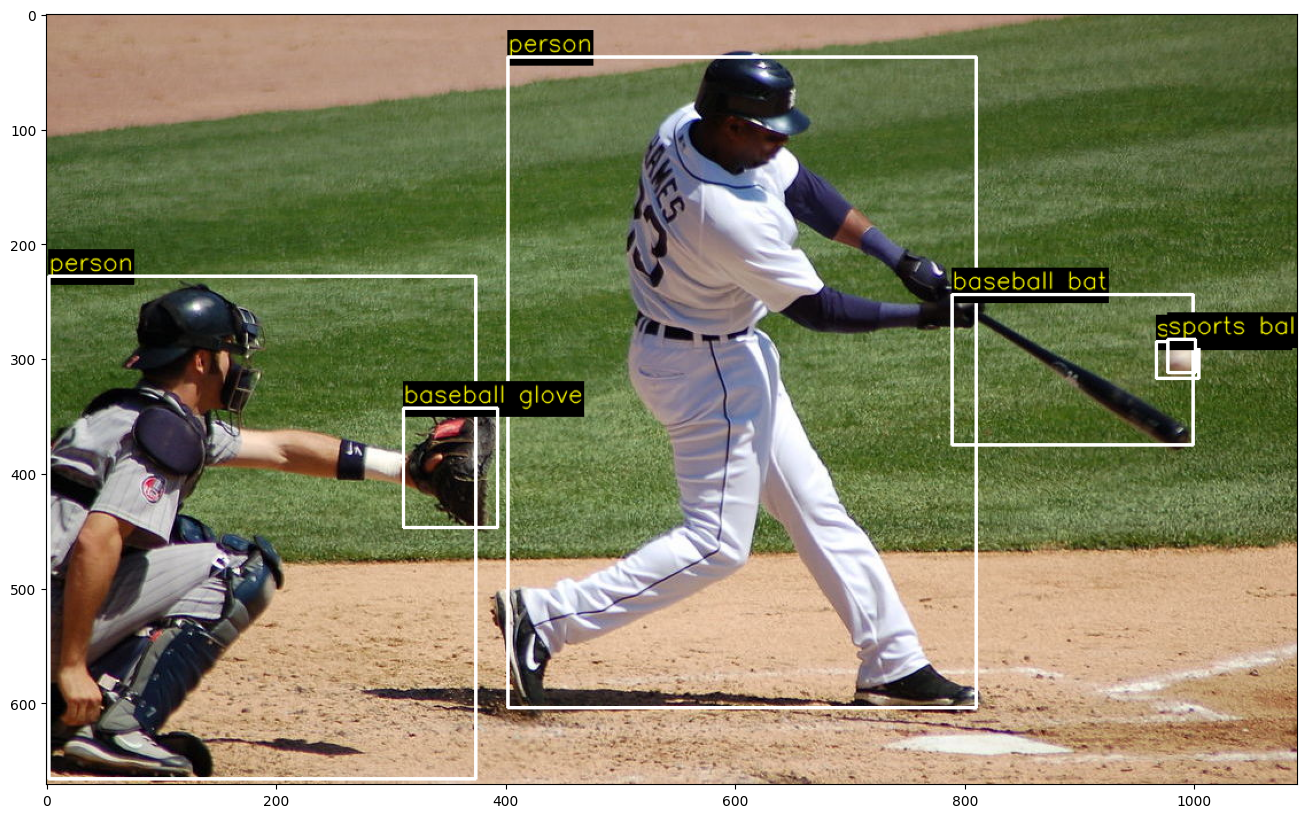
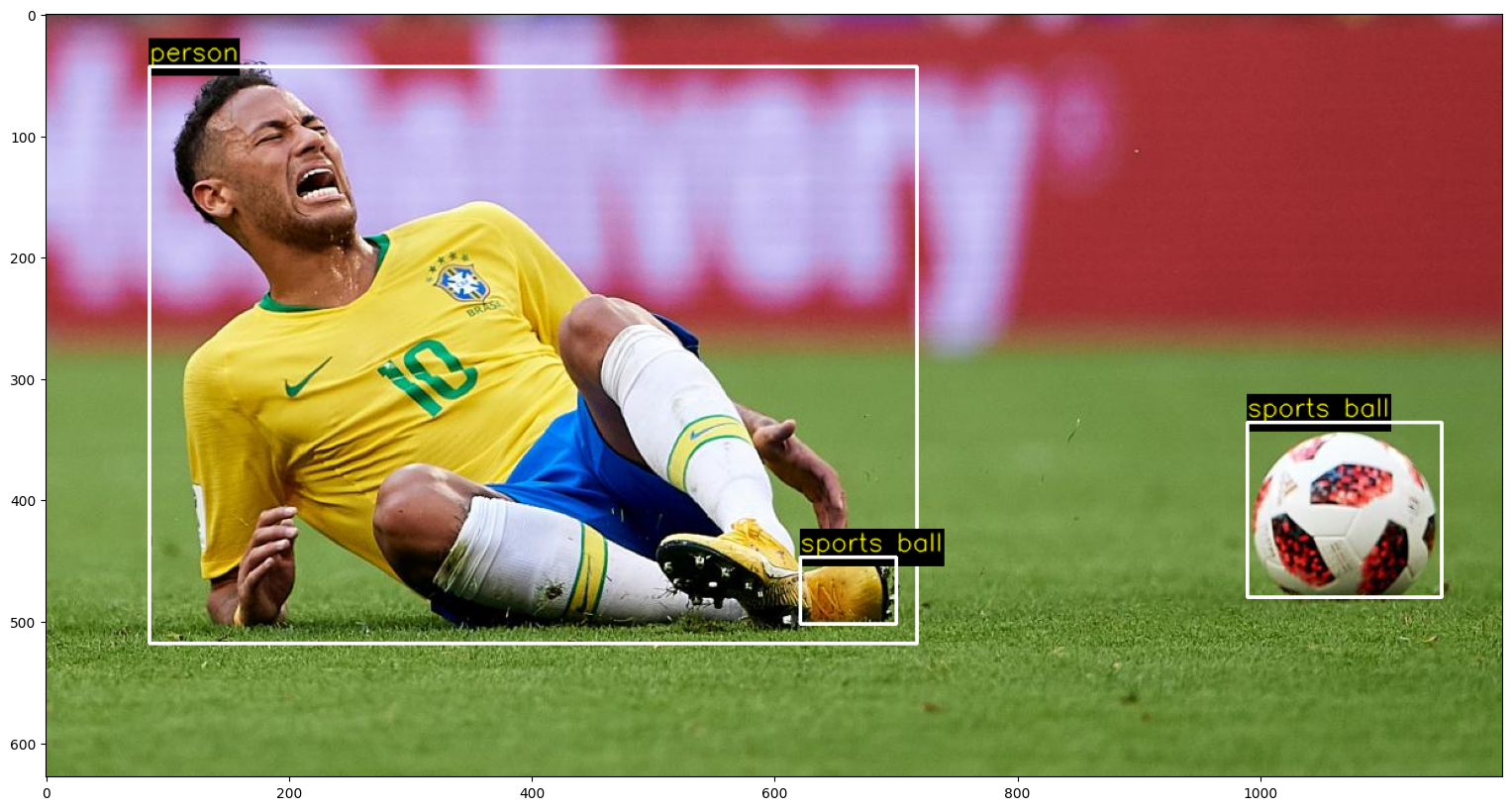
False Alarm
im = cv2.imread(os.path.join("images", "soccer.jpg"))
objects = detect_objects(net, im)
display_objects(im, objects)